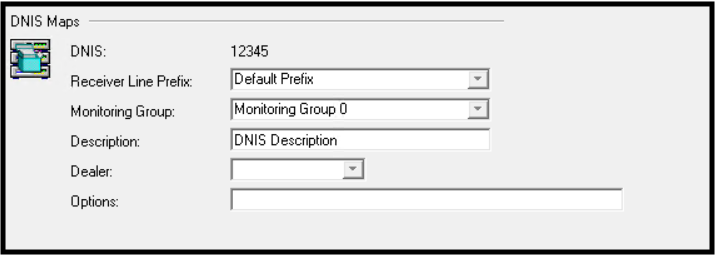
Depending on your business needs, your receiver configuration in Manitou may utilize Receiver Line Mapping or DNIS mapping. DNIS stands for Dialed Number Information Service, which means that based on the number dialed from the monitored location, the receiver knows what prefix, and when mapped, which dealer receives the event. This replaces the need to have a specific receiver line mapped for a single purpose or grouping of accounts. DNIS allows the mapping to be more dynamic and specific to a dealer or purpose.
Create a DNIS Map
- Navigate to the Receivers Form.
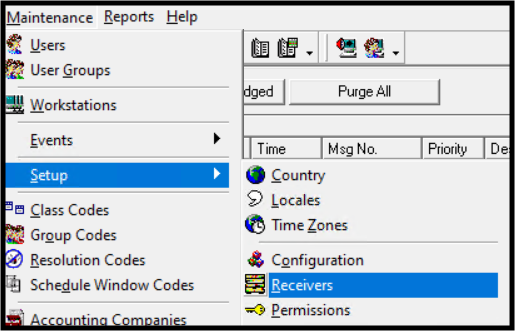
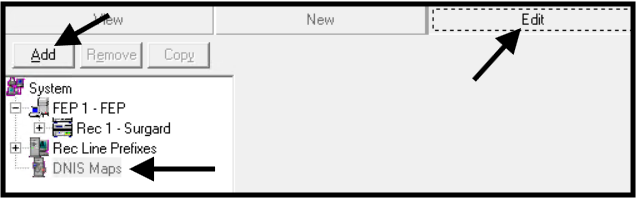
- Select DNIS.
- Click Edit.
- Click Add.
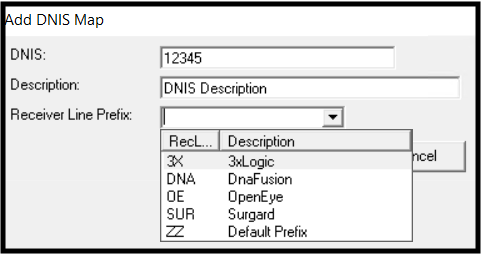
- Enter the number of digits that identify the Map. For example, if it is 5 characters and you have the last 4 as 1234, you would enter 01234 as the Map. Enter a description. This is useful for those who may need to update or address that particular mapping in the future. Be specific.
- If applicable to a specific dealer, select the dealer ID.
- If necessary, add any options that further detail the mapping. You will work with your Bold technician to manage this when required.
- Repeat for all necessary DNIS Maps.
- Save the Record.