There are times when an account does not yet exist within Manitou and the installer begins to send their signals into the Monitoring center. This creates "orphaned signals" into Manitou's default accounts. The question is... how do you move these signals that landed on the Default System Account into the appropriate Manitou customer record. There are two answers:
- Adding the Transmitter automatically "sweeps" signals that were in the default account, for a prescribed number of days, into the customer account upon saving the record. Each monitoring company sets this number of days within the Manitou Supervisor Workstation within the Options.
- Manually moving signals from the Default account into the new record.
Manually moving signals from default account into a customer record
The following details how to manually move the signals from the default "System" account into the account where the information should live.
- Locate the signals to move within the default system account. These are most often found within the Receiver System accounts such as SYS-REC1 or the like. If the Dealer has a Transmitter ID range and a Dealer System Account, the signals may arrive there instead of within the receiver defaults.
- Load the default account where the signals reside and click MOVE above the activity log either on the Details page or on the Activitiy log page.

- Enter the Receiver Line Prefix and Transmitter ID and click Search. This should load the customer record name where the signals will land.
- Set the from and to dates to move the activity. Please note that the current date doesn't include signals that occurred within the 24 hour period of the current day. To move items from the current day as well, select tomorrow. Also, be aware that activity lines that exceed 1000 records could create a lag and delay for the user.
- Click Move Logs.
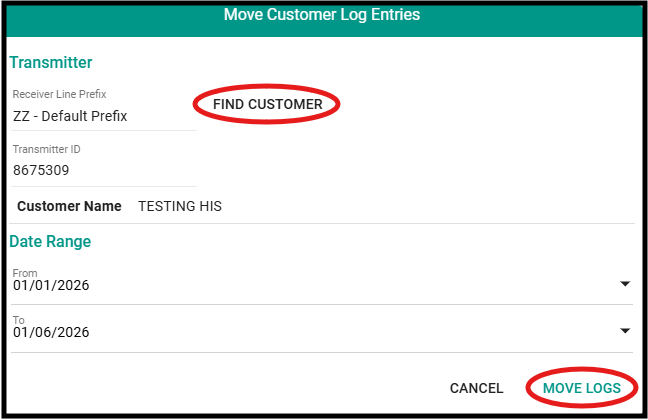
This sweeps the signals found in the activity log of the default account into the destination record.